
Autonomous dev pipeline · one container
Bring an idea. Leave with a working MVP.
Describe what you want to build in plain English. A team of agents (planner, executor, reviewer) implements it phase by phase against a real git repo, with deterministic checks between every step and an escalation path back to you when they get stuck.
Open source In beta The agents' code runs in a container
Why it exists
Cheap models fail in predictable ways.
Open-weight models like Qwen, Kimi, and MiniMax cost a fraction of frontier prices. They also fail in known, repeatable ways. Lullabeast is built around those failures instead of pretending they don't happen.
Frontier models need less of this. Cheap models need all of it. That's the whole product.
-
How it's handledEvery deletion has to be announced up front. If a file disappears that wasn't, the gate flags it and the phase re-runs.
-
How it's handledContext is cleared between tasks and each one stays atomic, so focus stays narrow against a clear definition of done. The reviewer then checks those principles held across the whole phase.
-
How it's handledA phase can't close until the gate confirms every required test exists, is structured correctly, and passes.
-
How it's handledEach agent gets three real attempts before anything is flagged to you, and timeouts catch an agent that never starts or hangs mid-run, so one dropped turn never sinks the run.
How it works
From a conversation to a committed branch.
You shape the idea in a chat with prd-creator, refining a structured PRD until it's right. The roadmap-converter turns that into a roadmap of ordered phases, and from there every phase runs the same short loop, where nothing advances on an agent's own say-so.
Setup · once per project
Per phase · repeats until the roadmap is done
Every gate between those steps is plain Python, not a model. It reads git and the filesystem for hard evidence (a real commit, passing tests, a clean diff) and refuses to advance without it. That's the part that makes cheap models safe to trust with your repo.
When a gate can't be satisfied (repeated failures, a blown budget, an ambiguous spec), the run stops and asks you instead of guessing. The escalation agent can read and explain, but it has no shell, no edits, no browser.
When the whole roadmap is finished, the pipeline writes up what shipped across every phase and suggests where to take it next, so you land with a clear place to pick up.
The dashboard
A dashboard, not a command line.
The terminal is only for launch (docker compose up); everything real happens in the browser, built for everyone, not just people who live in a terminal.
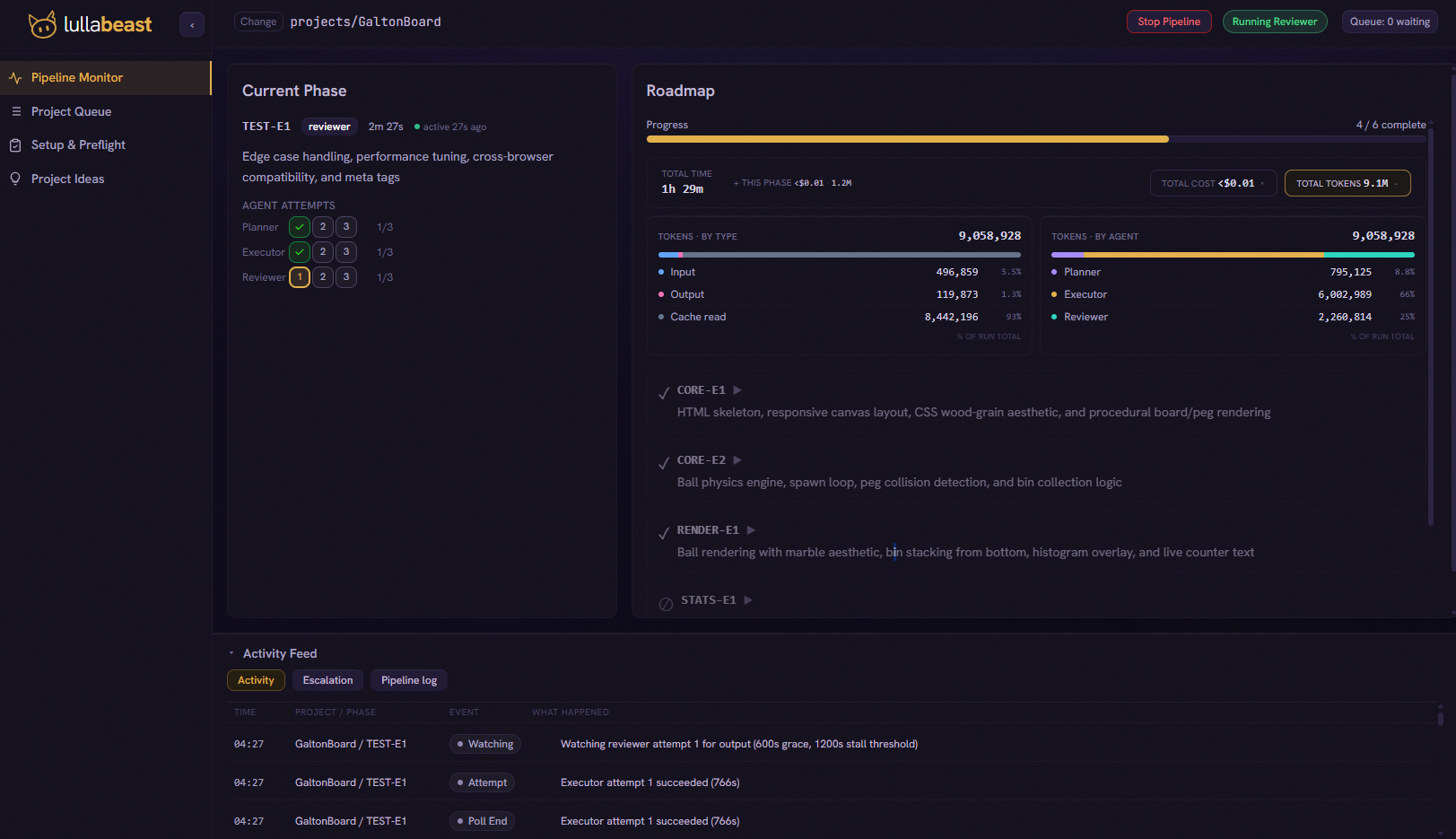
- Chat an idea into a PRDthen generate the roadmap. No files to hand-write.
- Launch and watch livethe planner, executor, reviewer loop, phase by phase.
- See what it spendscost and tokens, per phase and per agent, as it runs.
- Answer escalations inlinewhen a phase needs you, resolve it right there.
Living proof
MultiLife: built twice to compare.
I gave it one brief: a multi-team Conway's Game of Life where colored teams contest territory, with live analytics and a verdict when the board stabilizes. Then I ran the same PRD and the same eleven phases two ways, on local Qwen and on cloud open-weight models, to see what the price of "cheap" actually buys.
Qwen3.6-27B-MTP Q8_0Qwen3.6-27B-MTP Q8_0Qwen3.6-27B Q8_0Total cost
--
no API spend; local compute (power) wasn't metered
glm-5.2kimi-k2.7-codekimi-k2.7-codeTotal cost
$6.90
real API bill: $1.21 planner / $3.86 executor / $1.84 reviewer
same PRD, same eleven phases, both runs measured end to end. No estimates anywhere on this page.
Both are real and clickable, go see for yourself ↓
Walk the dashboard
See the run without installing anything.
A guided, click-through tour of the real dashboard, replaying this build phase by phase: the idea chat, the roadmap, the live planner / executor / reviewer loop, and every phase's real cost and tokens.
Open the walkthrough → Live demo ↗The finished app
MultiLife, running in your browser.
Both builds embedded live, side by side: switch between the local and cloud output, pick four teams, watch the fronts collapse and the endgame verdict land.
Play the live build →What else it builds
More than a one-off.
MultiLife is one of several. The same pipeline has also built GridBeast (a mini spreadsheet tool), a 2048 with correct merge semantics, a live regex tester, and SVG Pictionary, a multi-screen game with persistent state and live simultaneous LLM calls. Every one ships with the exact PRD and phased roadmap that drove it.
What it won't do
The honest limits.
The whole point is to be straight about where this is and isn't ready. Here's what to expect before you install anything.
It's in beta
I've worked on this for months and made significant improvements in output, but it's still far from perfect. I'm releasing it now to get real-world feedback and find where it breaks. Bug reports and contributions are welcome!
Coding agents are as risky as their access
The executor runs agent-written code in a hardened, non-root container, so it can't reach your host beyond the project folder it builds in. However, it can still reach the internet, since cloud models need it, so I'm flagging that for viz.
It won't deploy for you
You get a working build committed to a real git branch, not a hosted, production-ready service. Lullabeast takes on the initial development; enhancements and deployment are separate for now.
Hard projects/phases escalate
It shines on small, focused webapps. If the scoped tasks are something too large or intricate, it stops and asks for help rather than accept an output that fails to meet expectations.
It's a single-user local tool
One access token, loopback only. No accounts, roles, or multi-user, by design for now.
Get started
Now it's a single docker compose up.
Everything, including OpenClaw, ships inside the image, pinned and pre-configured. There's no separate runtime to install or wire up, and the bare-metal path from 0.2.x is gone. Clone, add a key, bring it up.
-
1
Clone and add your key.
Drop into the deploy folder and copy the example env. Add your model key now, or skip it and enter it in the dashboard on first boot.
git clone https://github.com/bigbraingoldfish/lullabeast.git cd lullabeast/deploy cp .env.example .env -
2
Bring it up.
One command. First boot renders the config, runs the installer, and checks itself with the doctor (the built-in health check) before it's ready.
mkdir -p projects docker compose up -d -
3
Open the dashboard.
The boot log ends with your dashboard URL and its access token. Open it on the machine running Docker. A Snake game and an onboarding tour are bundled, so the pipeline works with nothing to author first.
docker compose logs